An SSH and SFTP client for Windows, in one window.

Most Windows setups end up as a terminal in one app, a file transfer tool in another and a monitoring tab in the browser. PocketCmd is all three: native SSH on libssh2, a full SFTP manager, dashboards over the connection you already have — drawn by a C renderer with FreeType and HarfBuzz, not by a bundled browser.

Installer (.msix) — publishing… See pricing

Free for one server. No account, no card, no catch.

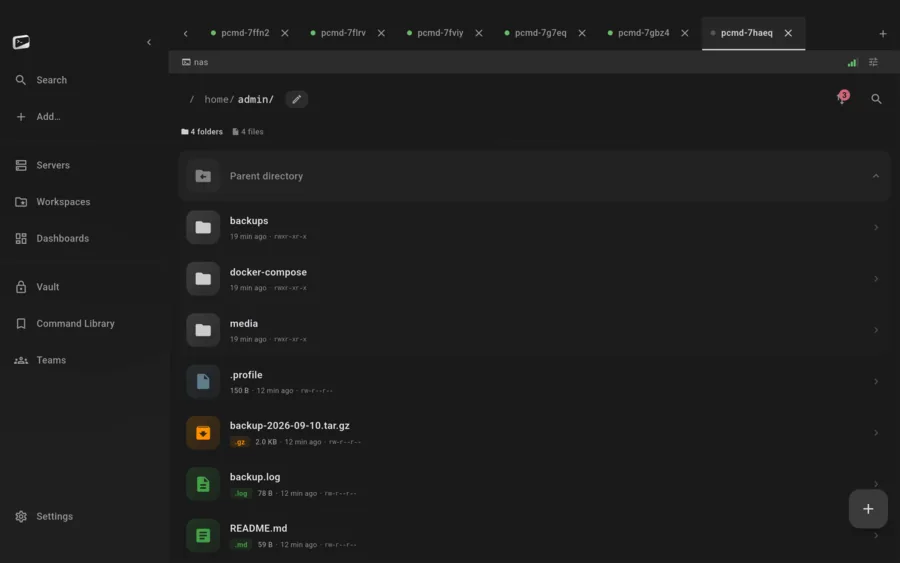
PocketCmd on Windows: the SFTP file manager listing a remote home directory with permissions and sizes
Requires
Windows 10 and 11
Channel
Installer (.msix)
Upgrades
In place, vault intact
Vault key
TPM 2.0 where present

Built for Windows.

Terminal and file manager, same app.

A real SFTP file manager with POSIX permissions, symlinks, search and bookmarks, sitting next to the terminal rather than in a second program — plus "terminal here" from any folder, and remote locations exposed to Explorer so other apps can open files off a server.

The TPM seals the vault key.

On a machine with TPM 2.0 the device vault key is generated in the chip and stays there, with your app password mixed in through Argon2id. Where there is no usable TPM the app says so plainly in its own security audit rather than reporting a hardware key it does not have.

Upgrades that keep your setup.

The .msix installs and upgrades in place, carrying your vault, servers, keys and settings across versions. Storage is one SQLCipher database rather than a scattering of config files, so there is a single thing to back up and a single thing to migrate.

No WSL, no bundled browser.

The SSH, Mosh and Eternal Terminal clients are native C and C++ reached over FFI, and the terminal is parsed by libvterm and drawn by our own renderer. Nothing here shells out to WSL or ships a copy of Chromium to paint text.
What this build does, and what it doesn't.

A handful of capabilities depend on what the operating system hands us. Rather than scatter them through the page and qualify them in the footnotes, here is the honest split for Windows.

On Windows

  • The desktop shell: sidebar, tabs, right-click
  • TPM 2.0-sealed vault key where present
  • Explorer integration for remote folders
  • In-place .msix upgrades
  • Drag-and-drop upload

Not on Windows

  • Biometric app unlock — the lock is your password
  • Push alerts while the app is closed (iOS and Android only)
  • Camera QR pairing — Windows pairs by pasting the URL
  • In-app web preview — not yet verified on WebView2

Everything else is the same app.

One codebase with a native C core builds all five platforms, so the parts that matter are not a tier list. These are identical on your PC and on everything else you run it on.

  • SSH, Mosh, Eternal Terminal and Telnet
  • The native C terminal renderer, 24-bit color
  • tmux auto-attach and live session state
  • The full SFTP file manager
  • Workspaces with the tabbed code editor
  • Multi-hop ProxyJump and port forwarding
  • Dashboards over SSH, no agent to install
  • The encrypted secrets vault
  • Snippets and the command library
  • No account, no telemetry, no relay

Windows questions.

More in the general FAQ and the documentation.

Does PocketCmd for Windows need WSL?

No. The SSH, Mosh and Eternal Terminal clients are native code running inside the app, and the terminal is our own renderer. WSL is not involved at any point.

Is it an Electron app?

No. The UI is Flutter and everything underneath it — the protocols, the terminal parsing, the rendering — is a native C/C++ core reached over FFI. There is no bundled browser engine drawing the terminal.

Will upgrading wipe my servers and vault?

No. The .msix upgrades in place and your vault, saved servers, keys and settings carry across. Everything lives in one encrypted SQLCipher database, so it is also one file to back up.

What if my PC has no TPM?

The app still works and the vault is still encrypted, but the device key is a software key rather than a hardware-sealed one. PocketCmd reports that honestly in its device key self-check instead of claiming hardware backing it cannot prove.

One license, every platform.

A Pro license code covers three devices at once, on any mix of the five.

Put a server console on your PC.

Free for one server, with no account and no time limit. Pro lifts the limits.

Installer (.msix) — publishing… All platforms