The iPad stops being the compromise machine.

In landscape, PocketCmd drops the phone layout and runs the same desktop shell as the Mac, Windows and Linux builds: a server sidebar, session tabs across the top, right-click menus and drag-and-drop upload. With a keyboard attached, it is the workstation the iPad keeps being told it could be.

App Store — publishing… See pricing

Free for one server. No account, no card, no catch.

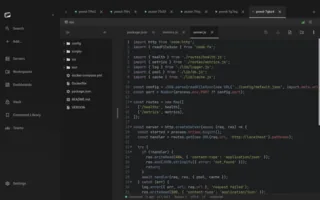
PocketCmd on iPad: a project open in a workspace with a file tree, a tabbed code editor and a status bar
Requires
iPadOS 15 or later
Channel
App Store
Layout
Desktop shell in landscape
Input
Hardware keyboard and trackpad

Built for iPad.

A sidebar and session tabs, not a phone stretched wide.

Landscape iPads get the desktop shell: your fleet in a resizable sidebar, every live session as a tab, right-click context menus and drag-and-drop from other apps. Rotate to portrait and it folds back into the mobile layout without dropping a connection.

Open a server as a project.

A workspace is one saved server plus one remote folder, opened the way you would open a repository: a lazy file tree, a tabbed editor with syntax highlighting and folding, fuzzy quick-open by filename, and a content search that runs grep on the server instead of dragging your files down to find a string.

Split screen, and then some.

Pro adds split screen and multi-pane layouts, so a workspace, a live terminal and a web preview of what the box is serving sit side by side on one iPad screen. Input focus follows the pane you touched, and each pane resizes its own PTY.

tmux you can actually touch.

Sessions, windows and panes are modeled as live state pushed over tmux control mode, so the app knows the layout rather than guessing. You get a breadcrumb, a window tab strip and a proportional pane map you can tap — with the whole state channel switchable off if you would rather drive it with Ctrl-B.

iPad gets all of it.

A handful of capabilities depend on what the operating system hands us, and some platforms come up short on them. iPad is not one of them — every capability the app has is available here.

On iPad

  • The desktop shell in landscape
  • Hardware keyboard and trackpad support
  • Face ID and Touch ID unlock
  • Push alerts from your own server
  • QR pairing and SSH config import by camera
  • In-app web preview
  • Drag-and-drop with the iOS Files app

Everything else is the same app.

One codebase with a native C core builds all five platforms, so the parts that matter are not a tier list. These are identical on your iPad and on everything else you run it on.

  • SSH, Mosh, Eternal Terminal and Telnet
  • The native C terminal renderer, 24-bit color
  • tmux auto-attach and live session state
  • The full SFTP file manager
  • Workspaces with the tabbed code editor
  • Multi-hop ProxyJump and port forwarding
  • Dashboards over SSH, no agent to install
  • The encrypted secrets vault
  • Snippets and the command library
  • No account, no telemetry, no relay

iPad questions.

More in the general FAQ and the documentation.

Is the iPad version a separate purchase?

No. It is one universal build on the App Store, so installing on iPhone installs on iPad too. A Pro license code covers three devices at once across any mix of iOS, Android, macOS, Windows and Linux.

Do I need a hardware keyboard?

No, but it is the point of the iPad build. Without one you get the mobile keyboard toolbar — customizable keys, chords and macros, with the control sequences encoded as data rather than hard-coded. With one, modifiers and function keys reach the remote shell directly.

What is the difference between the iPad and the desktop builds?

Almost nothing at the feature level — the same protocols, renderer, SFTP, workspaces and vault. The iPad keeps the two mobile-only capabilities the desktop builds lack, push alerts and camera QR pairing, and like a Mac with Touch ID it unlocks with biometrics.

Can I edit files on a server from an iPad?

Yes. Workspaces give you a tabbed code editor over SFTP with syntax highlighting, find/replace and a diff viewer. Saves are atomic — a temp file renamed over the target — and PocketCmd checks whether the remote changed while you were editing before it overwrites anything.
One license, every platform.

A Pro license code covers three devices at once, on any mix of the five.

Put a server console on your iPad.

Free for one server, with no account and no time limit. Pro lifts the limits.

App Store — publishing… All platforms