The same core as the phone, with a desk to put it on.

PocketCmd for macOS is not a port and not a wrapper — it is the same native C core and the same terminal renderer, wearing a desktop shell: a server sidebar, session tabs, right-click menus and drag-and-drop. Pair it with your phone through your own server and the fleet you built on one shows up on the other.

Disk image (.dmg) — publishing… See pricing

Free for one server. No account, no card, no catch.

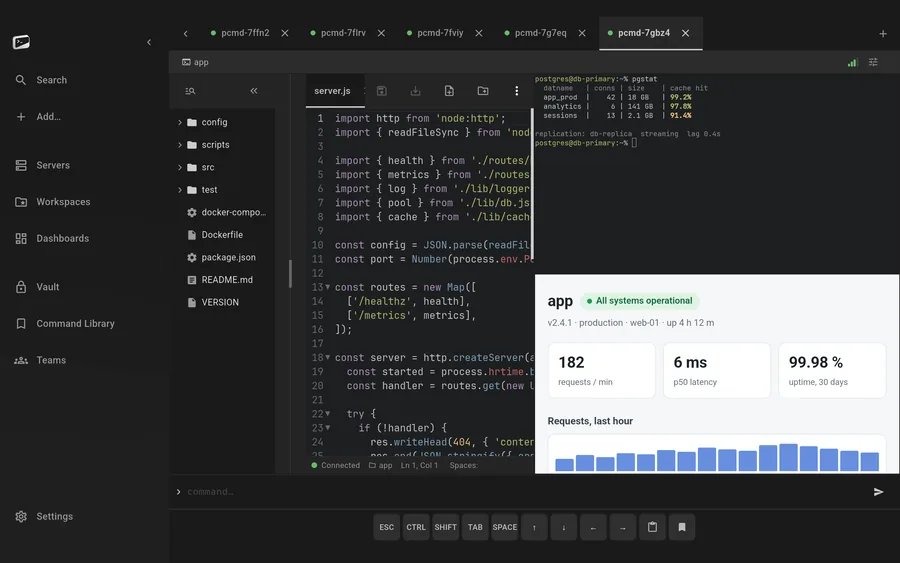
PocketCmd on macOS: a split view with a workspace, a live terminal and a web preview of the served site
Requires
macOS 13 or later
Channel
Disk image (.dmg)
Architectures
Apple silicon and Intel
Distribution
Notarized and sandboxed

Built for macOS.

Notarized, sandboxed, universal.

One disk image covering Apple silicon and Intel, notarized by Apple and running inside the sandbox — so it asks for the folders it needs instead of taking the whole disk. It updates in place and leaves your vault, servers and keys exactly where they were.

Three panes and a live preview.

macOS is one of the two platforms with the in-app web preview, so a workspace, a terminal and the page the box is actually serving can sit side by side — edit, save over SFTP, watch it reload. Pro unlocks the multi-pane layouts.

The vault key is sealed to the Mac.

The device vault key lives in the Secure Enclave and never leaves it, with your app password stretched through Argon2id and mixed in. On a Mac with Touch ID, your fingerprint unlocks the app: it releases that same password factor from a key held in the Secure Enclave, so it is a shortcut to the password, not a way around it.

Remote folders in Finder.

Servers appear in Finder as locations, so anything on the Mac can open a file off a remote box directly. Underneath it is the full SFTP manager — POSIX permissions, symlinks, search, bookmarks and resumable SHA-256-verified transfers.
What this build does, and what it doesn't.

A handful of capabilities depend on what the operating system hands us. Rather than scatter them through the page and qualify them in the footnotes, here is the honest split for macOS.

On macOS

  • The desktop shell: sidebar, tabs, right-click
  • Secure Enclave-sealed vault key
  • Touch ID unlock on Macs that have it
  • In-app web preview
  • Finder integration for remote folders
  • Camera capture for attachments
  • Drag-and-drop upload

Not on macOS

  • Push alerts while the app is closed (iOS and Android only)
  • Camera QR pairing — the Mac pairs by pasting the URL

Everything else is the same app.

One codebase with a native C core builds all five platforms, so the parts that matter are not a tier list. These are identical on your Mac and on everything else you run it on.

  • SSH, Mosh, Eternal Terminal and Telnet
  • The native C terminal renderer, 24-bit color
  • tmux auto-attach and live session state
  • The full SFTP file manager
  • Workspaces with the tabbed code editor
  • Multi-hop ProxyJump and port forwarding
  • Dashboards over SSH, no agent to install
  • The encrypted secrets vault
  • Snippets and the command library
  • No account, no telemetry, no relay

macOS questions.

More in the general FAQ and the documentation.

Does PocketCmd for Mac run on Intel?

Yes. The disk image is universal, covering both Apple silicon and Intel Macs on macOS 13 or later.

Does the Mac app unlock with Touch ID?

Yes, on Macs with Touch ID. After you unlock once with your app password, the lock screen offers Touch ID from then on; there is nothing to turn on. Touch ID releases the same password-derived factor from a key held in the Secure Enclave, so the vault still needs this Mac and your app password, and your fingerprint stands in for typing it. If the Mac's fingerprint enrollment changes, the app asks for the password once before Touch ID works again.

Do I get push alerts on macOS?

Not yet. Threshold alerts from your self-hosted server are pushed to iOS and Android; macOS is technically capable over APNs but stays off until the entitlements and relay support land. Dashboards and alerts still work in the app while it is running.

How do I pair the Mac with my self-hosted server?

By pasting the pairing URL rather than scanning a QR code — camera QR scanning is a mobile capability. Everything after that is identical: mutual TLS, short-lived certificates, and a vault that syncs as ciphertext your server cannot read.

One license, every platform.

A Pro license code covers three devices at once, on any mix of the five.

Put a server console on your Mac.

Free for one server, with no account and no time limit. Pro lifts the limits.

Disk image (.dmg) — publishing… All platforms