An SSH client for iPhone that keeps the session.

iOS suspends what it is not looking at, which is why a plain SSH session dies the moment you switch apps. PocketCmd ships custom Mosh and Eternal Terminal clients, so the session comes back — after a lock screen, after a train tunnel, after the app itself restarts.

App Store — publishing… See pricing

Free for one server. No account, no card, no catch.

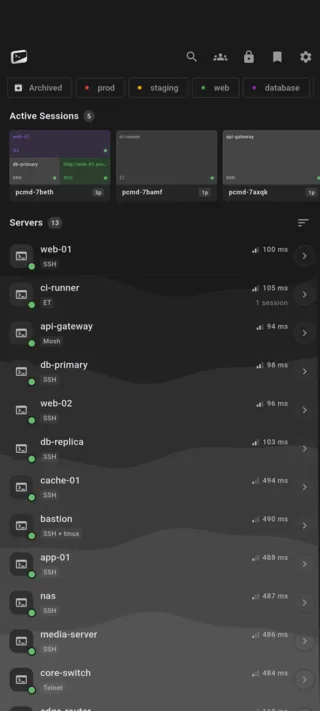
PocketCmd on iPhone: a server list in four groups with tags, protocol badges and two live session cards
Requires
iOS 15 or later
Channel
App Store
Devices
iPhone and iPod touch
Vault key
Secure Enclave

Built for iPhone.

The session outlives the app.

Mosh roams over UDP and Eternal Terminal reconnects over TCP where UDP is blocked. Both were written from scratch against the real protocols, so an IP change, a sleeping phone or a cold app start resumes the screen you left rather than dropping you at a fresh prompt.

Keys sealed in the Secure Enclave.

This device's vault key is generated inside the Secure Enclave and never leaves it. Your app password is stretched with Argon2id and mixed in, so an attacker needs the phone and the password. Face ID or Touch ID stands in for typing that password, it does not replace it.

Your servers show up in Files.

Remote directories mount into the iOS Files app, so any other app can open a file straight off a server without a download-edit-upload round trip. Transfers are resumable and SHA-256 verified, and they keep running in the background once iOS hands over a processing window.

A terminal, not a web view.

Parsing is vendored libvterm and drawing is a C renderer on CoreText and IOSurface, with NEON-vectorized blitting straight into a GPU texture. There is no JavaScript canvas anywhere in the path, which is why 24-bit color and a fast scroll hold 60 fps on a phone.

iPhone gets all of it.

A handful of capabilities depend on what the operating system hands us, and some platforms come up short on them. iPhone is not one of them — every capability the app has is available here.

On iPhone

  • Face ID and Touch ID unlock
  • Push alerts from your own server
  • QR pairing and SSH config import by camera
  • In-app web preview
  • Voice input for commands
  • Share sheet and the iOS Files app
  • Background keep-alive for transfers

Everything else is the same app.

One codebase with a native C core builds all five platforms, so the parts that matter are not a tier list. These are identical on your iPhone and on everything else you run it on.

  • SSH, Mosh, Eternal Terminal and Telnet
  • The native C terminal renderer, 24-bit color
  • tmux auto-attach and live session state
  • The full SFTP file manager
  • Workspaces with the tabbed code editor
  • Multi-hop ProxyJump and port forwarding
  • Dashboards over SSH, no agent to install
  • The encrypted secrets vault
  • Snippets and the command library
  • No account, no telemetry, no relay

iPhone questions.

More in the general FAQ and the documentation.

Does the SSH session survive switching apps on iPhone?

iOS suspends a backgrounded app, so a plain SSH connection will eventually be torn down — that is true of every iOS SSH client. PocketCmd answers it three ways: Mosh and Eternal Terminal resume the session when you come back, tmux auto-attach keeps your work running on the server regardless, and session state is restored after a full app restart.

Which iPhones does PocketCmd support?

Any iPhone running iOS 15 or later. The app is a universal build, so the same purchase also installs on iPad, where it switches to the desktop shell in landscape.

Do I need an account to use PocketCmd on iOS?

No. There is no sign-up and no cloud account anywhere in the app. Your phone connects straight to your servers, and the free tier covers one saved server with no time limit. Pro is a license code, not an account.

Where does PocketCmd store my SSH keys on iPhone?

In the iOS keychain, sealed under a device vault key held in the Secure Enclave. Keys are never written to disk in plain text, and they are erased from memory immediately after use. Nothing is uploaded unless you pair your own self-hosted server, and then only as ciphertext.
One license, every platform.

A Pro license code covers three devices at once, on any mix of the five.

Put a server console on your iPhone.

Free for one server, with no account and no time limit. Pro lifts the limits.

App Store — publishing… All platforms