A modern Android SSH client, actively built.

If the Android SSH client you relied on stopped getting updates, this is the replacement: native SSH on libssh2 and OpenSSL, Mosh and Eternal Terminal written from scratch, a real SFTP file manager, tmux you can touch, and a terminal renderer in C rather than a web view.

Google Play — publishing… See pricing

Free for one server. No account, no card, no catch.

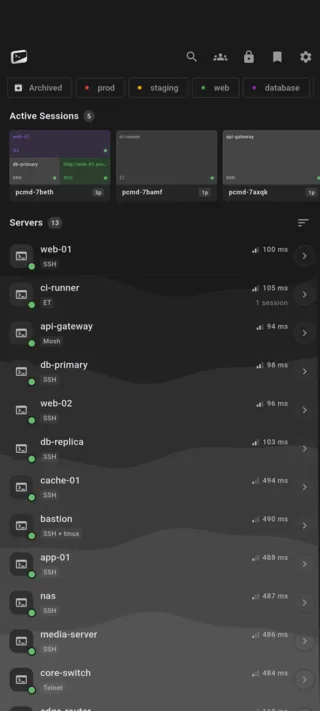
PocketCmd on Android: a server list in four groups with tags, protocol badges and two live session cards
Requires
Android 7.0 or later
Channel
Google Play
Devices
Phones, tablets and Android XR
Vault key
StrongBox or the TEE

Built for Android.

A foreground service keeps the connection up.

This is the thing Android can do that iOS cannot. An optional foreground service holds your sessions open while the app is in the background, with wake and Wi-Fi locks you enable per category rather than all at once — so a long build keeps streaming instead of dying at the lock screen.

Keys in StrongBox, not in a preferences file.

The device vault key is generated in StrongBox or the TEE where the phone has one, and the app verifies the key attestation rather than trusting the claim — a device that says StrongBox while holding a software key it could exfiltrate is flagged as downgraded, not waved through.

Tablets and XR get the desktop shell.

On a landscape tablet the layout becomes a sidebar, session tabs and right-click menus. On Android XR each session opens as its own spatial window in Home Space, so a fleet becomes a set of panels you arrange around you rather than a stack of tabs.

Your servers in the Android file picker.

Remote directories are exposed to the system picker, so any app that opens a file can open one off a server. Transfers resume after a drop and are verified with SHA-256, continuing under WorkManager when you leave the app.

Android gets all of it.

A handful of capabilities depend on what the operating system hands us, and some platforms come up short on them. Android is not one of them — every capability the app has is available here.

On Android

  • Fingerprint and face unlock
  • Push alerts from your own server
  • QR pairing and SSH config import by camera
  • Foreground-service keep-alive
  • In-app web preview
  • Voice input for commands
  • Share sheet and the system file picker
  • Desktop shell on tablets and Android XR

Everything else is the same app.

One codebase with a native C core builds all five platforms, so the parts that matter are not a tier list. These are identical on your Android phone and on everything else you run it on.

  • SSH, Mosh, Eternal Terminal and Telnet
  • The native C terminal renderer, 24-bit color
  • tmux auto-attach and live session state
  • The full SFTP file manager
  • Workspaces with the tabbed code editor
  • Multi-hop ProxyJump and port forwarding
  • Dashboards over SSH, no agent to install
  • The encrypted secrets vault
  • Snippets and the command library
  • No account, no telemetry, no relay

Android questions.

More in the general FAQ and the documentation.

Is there an APK I can sideload?

No. Google Play is the only public channel for the Android build, so the app you install is the one we signed and Play verified. Installing a server-key-handling terminal from an unverified mirror is exactly the trade you do not want to make.

Does PocketCmd keep SSH connections alive in the background on Android?

Yes. An optional foreground service holds sessions open while the app is backgrounded, with per-category wake and Wi-Fi locks so you decide what is worth the battery. Mosh and Eternal Terminal also resume a session that did drop, and tmux keeps your work running on the server either way.

Does it work on Android tablets?

Yes, and it changes shape for them. A landscape tablet gets the same desktop shell as the Mac, Windows and Linux builds: a server sidebar, session tabs, right-click menus and drag-and-drop upload.

Does PocketCmd need root?

No. It is an ordinary Play app. It needs no root, no special permissions beyond the ones you grant for the camera QR scanner and notifications, and it installs nothing on the servers you connect to.
One license, every platform.

A Pro license code covers three devices at once, on any mix of the five.

Put a server console on your Android phone.

Free for one server, with no account and no time limit. Pro lifts the limits.

Google Play — publishing… All platforms